
Help Center
How to Use the ValuePest App
No calls. No hassle. Professional pest control at your fingertips. ValuePest is designed to make pest control booking fast, transparent, and stress-free. Here’s how it works from start to finish..
Step 1: Sign In & Select Your Pest Issue
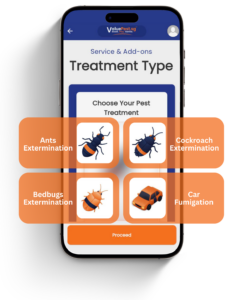
Start by signing in using Google Sign-In (or Apple Sign-In on iOS). There’s no registration form or passwords to remember, your account is created instantly and securely. Once logged in, select the type of treatment you need, including:
- Cockroaches
- Ants
- Bedbugs
- Car fumigation
- And many more to come
Step 2: Enter Your Location
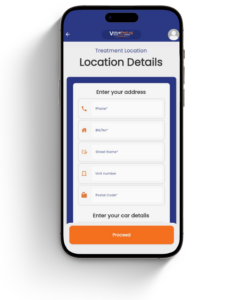
To proceed with your booking, do provide your service address. For your convenience, all addresses entered can be saved to your secure profile, allowing for a faster checkout experience in the future.
Our system supports the management of multiple locations, giving you the flexibility to add new service sites or remove outdated ones at any time. If you are a returning user, your saved information will be ready and waiting, so you can finalize your appointments without the need for repetitive data entry.
Step 3: Choose a Time Slot & Confirm Details
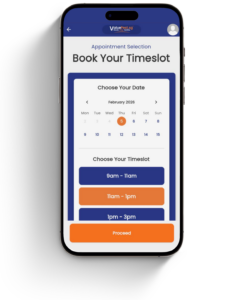
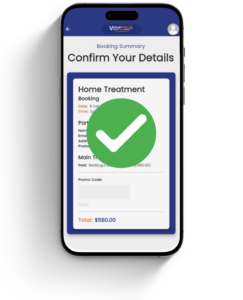
Finding the perfect time is easy, just browse our in-app calendar and choose the appointment slot that works best for you. After you’ve picked your date and time, we will provide you with a full, transparent booking summary to look over before any payment is processed.
This is your chance to double-check the details, ensure your service requirements are correct, and make any necessary adjustments.
Once you’re happy with the summary, you can move forward to payment with total peace of mind, knowing that your booking is perfectly tailored to your needs.
Step 4: Pay Securely & Get Instant Confirmation
Complete your booking using our secure payment options either via PayNow, GrabPay or Credit / Debit Cards (via Stripe). Once payment is successful:
- Your booking is instantly confirmed
- A licensed pest control specialist will arrive on time, as scheduled
- No hidden charges, guaranteed
You can track your services easily from the home page: Upcoming Bookings, to view confirmed future appointments and Past Bookings, to review completed treatments. To log out, simply tap your profile icon at the top-right corner of the app.
Can’t See Prices & Not Sure How to Log In?
Pricing & Account Access
To ensure you receive the most accurate pricing and up-to-the-minute availability, we keep our pricing behind a secure login to ensure that the information you see is 100% accurate and currently available for your specific booking needs.
A Seamless Login Experience
We’ve eliminated the need for tedious manual registration forms. You can access your account instantly using your existing social credentials:
- iOS Users: Simply use Apple Sign-In or Google Sign-In for one-tap access.
- Android & Desktop Users: Google Sign-In is fully supported for a fast, secure entry. There is no “Sign Up” button or long password to remember, just sign in once using your preferred platform, and your account is automatically created and ready to go.
Important Account Reminder
To ensure you can always access your upcoming appointments and full treatment history, please consistently use the same login method. Your bookings, receipts, and personal preferences are securely tied to the specific Google or Apple account you choose today.
Sign-In & Account Issues
Secure Authentication at ValuePest
To provide you with the highest level of data security and a streamlined user experience, ValuePest exclusively utilizes Google and Apple Sign-In. This integration ensures your account remains protected by the world-class security protocols of these platforms.
Troubleshooting Sign-In Issues
If you are experiencing difficulties accessing your account or have forgotten your password, please note that ValuePest does not store or manage your login credentials. Because we rely on Google and Apple for authentication, sensitive information such as your Legal Name, Email Address, and Password is managed entirely by them, not by our system.
Quick Troubleshooting Checklist:
- Verify Your Account: Are you logged into the correct Google or Apple account on this device?
- Check Connectivity: Ensure your device is authorized to use “Sign in with Apple” or “Sign in with Google.”
- Password Reset: If you’ve forgotten your password, please visit the Google or Apple account recovery pages to update your credentials. Once updated there, you will be able to access ValuePest immediately.
When Should You Contact ValuePest Support?
You forgot which account was used for a specific booking
You can’t locate a treatment under your current login
You need help identifying which account a booking belongs to
Your Google / Apple account may be compromised and you’re concerned about account access
Account Deletion
We’re Sorry to See You Go
Please note that deleting your account is permanent and cannot be undone. Once processed, your profile, service history, and saved car/location details will be wiped from our system. If you are sure, please enter your registered email address below to confirm. What happens next?
- Any active bookings will be cancelled.
- You will no longer have access to past fumigation receipts or reports.
- Your personal data will be purged in accordance with our privacy policy.
Request Account Deletion
Your account will be permanently deleted within 48 hours.